

FAQ
MiFaZ is free
Registration
MiFaZ on your home screen
Uploading images
Scanning identification
Carpool safety
Coronavirus and carpools
Transporting items
Confirmation email
No way to make contact
My entry cannot be found
I no longer want requests
Deleting a user profile
Deleting an entry
Carpools on individual days
Follow-up emails
Can a vocational school offer MiFaZ?
A district is missing
Problems signing in
Trips at short notice
One-off trips
Adding fixed stops
Changing the route
Transporting minors
Information from the crime-prevention officer at the Federal Police Directorate Munich about staying safe when sharing rides:
Police advice about online carpool platforms
Does it cost anything to offer or search for trips?
MiFaZ is completely free for users. There is no charge for publishing an entry or searching for a ride. Driver and passengers agree a contribution to the travel costs between themselves. MiFaZ suggests an amount that can be changed at any time.
Regional and company MiFaZ portals are provided by our customers—districts, cities, municipalities and companies—which pay for setup and support.
Registration
Anyone aged 18 or over can register in a few steps. Select "Register" at the top right and enter a username, password and email address. We then send a message asking you to confirm that you intended to register. This prevents unwanted registrations.
Uploading images
Photos build trust before the first contact. The driver or passenger should be clearly recognisable.
Images must meet these requirements; otherwise we may reject them:
- The registered user must be shown—no other people, animals, avatars, comics, logos, slogans or unrelated content.
- Wherever possible, no other people should be visible.
- The photo should work in a round or square format.
- Supported formats are .jpg, .jpeg and .png.
- The maximum file size is 2 MB.
A car photo can be uploaded under "Vehicle". The registration plate does not have to be visible.
Scanning identification
Do not upload an identity card as a profile image. MiFaZ is not permitted to inspect an identity card or driving licence to identify a user, and these documents should not be scanned and forwarded. Our blog contains a detailed German-language article: Identity cards and carpool platforms.
Carpool safety
Carpooling depends on trust. MiFaZ cannot verify drivers by scanning identification. Drivers and passengers can, however, agree to show identification to each other. You can also tell a trusted person that you are taking a shared ride and contact them at the start and end of the journey. Our blog has a German-language article about personal trust and practical safety.
Coronavirus and carpools
For current information about illness, suspected infection and travel, consult the Robert Koch Institute and the German Federal Ministry of Health.
Official sources are better suited to checking current guidance than unverified online reports. Always discuss concerns directly with your fellow travellers before a trip.
Transporting items
MiFaZ can also arrange the transport of items. Create an entry and select "Transport items". Describe the item and requirements in the text field. Users can then discuss the details through the messaging system or by phone where a number is available.
MiFaZ on your home screen
The MiFaZ website is optimised for mobile use and adapts to different devices. To open it quickly, add www.mifaz.de to your home screen from the browser menu.
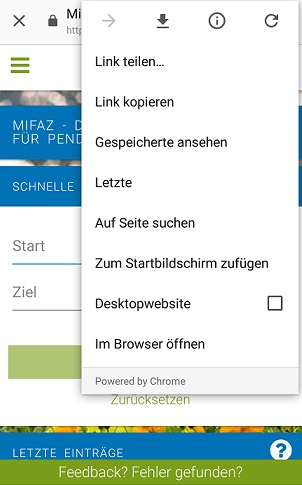
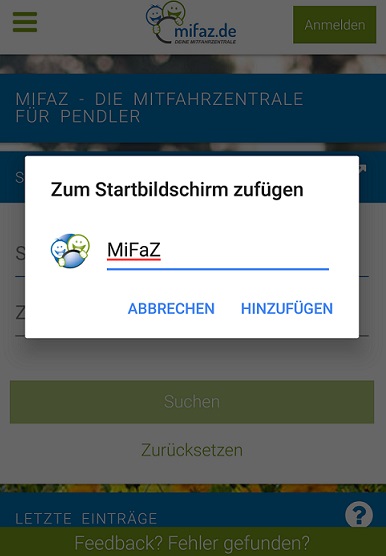
After confirming, choose a name or accept the suggested one.
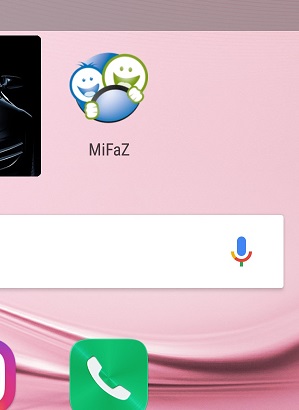
The MiFaZ icon then appears on the home screen and opens the site with one tap.
I did not receive a registration confirmation email
The system sends the confirmation automatically to the address entered during registration. Check your spam folder as well. If the message is not there, request another confirmation email.
I cannot find a way to contact a user
Users can generally be contacted only through one of their active entries because every request should relate to a particular trip. This reduces unrelated or spam requests and lets the system ask after a few days whether the contact resulted in a carpool. This feedback helps us report the effectiveness of the service to the organisations that fund it for users.
If an entry has no contact option, the user may have disabled email contact without providing a visible phone number. The system checks for this condition and contacts affected users.
My entry cannot be found
When you search while signed in, your own entry is excluded because you cannot form a carpool with yourself. To verify that it appears publicly, sign out and repeat the search.
I no longer want to receive requests
You have two options: delete your user profile or deactivate your entries.
To deactivate an entry, sign in, open "My entries and matches" from your user menu and move the green switch next to the entry to the left so that it turns red. The entry can no longer be found, but you can reactivate or edit it later.
How do I delete my user profile?
Sign in, open "Account" from the menu under your username, scroll to the bottom and select "Delete data". This permanently deletes your MiFaZ profile.
How do I delete my ride request or offer?
Sign in with your email address and password. If you have forgotten the password, select "Forgot password?" below the sign-in form and follow the instructions.
Open "My entries and matches", select the bin icon beside the entry and confirm with "OK".
I found a carpool for individual days
Please report this as a successful match as well; irregular trips also count. You may find it useful to add people you travel with repeatedly to a carpool so that their details remain easy to find.
What happens when I report a successful carpool?
Your entry remains active and is also displayed under "Carpools". You can add MiFaZ users as passengers there. The success is included in anonymous statistics that help our customers evaluate the service.
Can our vocational school offer MiFaZ to students?
Yes. You can add a link to www.mifaz.de—or to your city's regional MiFaZ portal—to the school's website free of charge.
For a more individual service, we can create a dedicated MiFaZ portal. Districts, municipalities, organisations and events of any size can receive a portal even if the surrounding city or municipality does not already operate one. For a modest annual fee based partly on the institution's size, the portal receives an individual design and locally adapted map and can be linked from the school's website.
A district is missing
The selector lists only districts and municipalities that are MiFaZ partners with their own individually adapted portal. You are welcome to ask your district whether it would like to become a partner.
You can still use MiFaZ if your region is not yet a partner. Search and publish entries on www.mifaz.de throughout Germany. A dedicated regional portal can provide more precise local places, streets, bus stops and other points.
I cannot sign in
If an error appears, first check the password. If you have forgotten it, select "Forgot password?" below the sign-in form, enter your email address and select "Send email".
Open the message from MiFaZ and select its link, or copy the address into your browser. Enter the new password twice and select "Change password". You can then sign in with the new password.
Can I find a ride at short notice, for example during a strike?
Yes, but create an entry yourself. For a single day, choose a one-off trip. New entries are visible immediately. Existing matches are shown during creation so that you can contact their owners straight away.
If there are no immediate results, a match may appear once someone reads your entry. During disruptions such as strikes, it is particularly important that everyone interested creates an entry instead of only searching.
I need a ride only on one particular day
MiFaZ supports one-off as well as regular trips. Select "New entry", choose a one-off trip and enter the exact date and departure time. Search results show these details. You can also contact someone offering a regular trip and ask whether you can join once.
Can I add fixed stops?
Yes. Add stops to tell other users where you will interrupt the journey or definitely take a break.
Can I change the assumed route?
Add stops to influence the route used for matching. Without stops, MiFaZ assumes the optimal route and also considers entries within a corridor around it, allowing matches that require only a small detour.
What should I consider when transporting minors?
We recommend a consent form signed by the parent or guardian and the driver. Showing identification to each other can help confirm that the correct people are involved. A German consent form is available here.
Why do I receive follow-up emails from MiFaZ?
The system sends automatic follow-up emails to find out whether a contact resulted in a carpool. These messages help us understand usage and success. Replying is optional but very helpful.
The system may also send a message about account problems—for example, when no phone number is provided and contact by email or the contact form is disabled. In that situation, nobody can respond to the user's entries.